
Mr. Number: Spam Call Blocker
HiyaCommunication
3.973.03K Reviews
- Version
- 14.7.5-11717
- Installs
- 10.00M
- Age Rating
- Everyone
Screenshots
Our Review of Mr. Number: Spam Call Blocker
 Analysis by Appyee
Have you ever felt like your phone is a magnet for spam calls? I know I have! Well, let me introduce you to Mr. Number: Spam Call Blocker. This app is like having a personal assistant who’s always on guard, ready to screen those pesky telemarketers and robocalls. Let me walk you through my experience with it.
How quickly it helps with unwanted calls
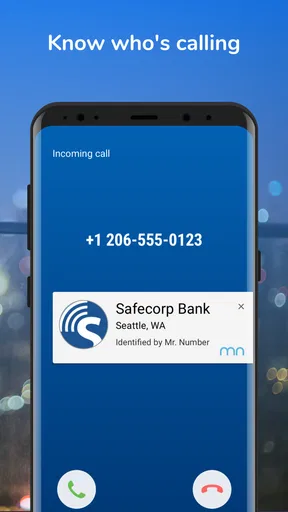
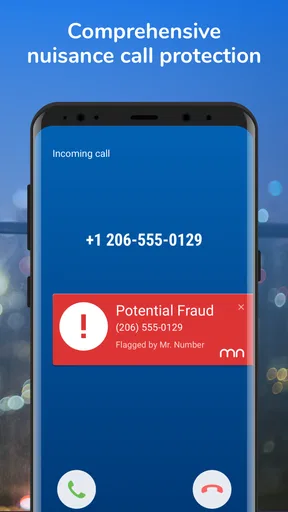
A call-screening app earns its place by being useful at the moment the phone rings, not just by offering a long settings menu. Mr. Number is designed to identify and block suspected fraud, scam, and spam calls, so its value is clearest when an unfamiliar number appears and you need to decide whether to answer. I would treat its warning as helpful context, not a guarantee: caller labels can guide a choice, but they should not replace judgment when a call could be important.
For a quick decision, I’d look at the incoming-call identification first, then use the call history afterward to check what happened. That simple habit helps separate a suspicious interruption from a missed call worth returning. It is also a more practical way to judge whether the app is helping than expecting every unwanted caller to disappear entirely.
Where a busy day puts it to the test
The most useful scenario is a day when you are expecting calls from people whose numbers you may not recognize, such as a delivery driver, a new client, or a service provider. Blocking every unknown caller would be risky in that situation. I’d keep the screening approach measured, review unfamiliar calls, and reserve stricter blocking for patterns I recognize as unwanted.
There is a trade-off here: stronger filtering can mean fewer interruptions, but any call-blocking tool needs sensible exceptions when your life depends on hearing from new contacts. If you are applying a block based on an area code, I would be especially cautious about assuming every number from that region is spam. A broad rule may catch unwanted calls, but it can also hide legitimate ones.
Choosing it over phone-level tools
Android’s built-in calling tools are often enough for someone who only wants to silence or block a handful of numbers. The advantage of a dedicated communication app is the added focus on identifying suspicious callers and contributing reports, rather than simply managing a personal block list. That makes this a better fit for someone who sees recurring unknown calls and wants more context before answering.
It is not automatically the right choice for everyone. If unwanted calls are rare, the phone’s own controls may be simpler and easier to maintain. If you depend on calls from unfamiliar numbers, an aggressive filter may be more hassle than help. I would start with the least restrictive approach that solves the problem, then adjust only if the interruptions continue.
What to check before relying on it
One practical question is whether the app is a good match for an older phone. Its minimum requirement is Android 6.0, which gives a clear baseline for compatibility, but the experience still depends on how your device handles calling apps and background activity. I would check that it remains available for incoming-call screening after setup and revisit its settings if the phone’s own battery or app-management tools restrict background work.
Another question is cost. The app is free to install, with optional in-app purchases ranging from $0.99 to $24.99 per item. I’d begin with the free experience and decide whether any paid option is useful only after seeing how often I use the core screening and blocking tools. There is no reason to pay simply because a feature exists; the right test is whether it solves a real annoyance for you.
Privacy-minded users may also want to think carefully before using any caller-identification service. The practical point is to read the app’s current permission and privacy screens during setup and decide whether the requested access fits your comfort level. If you would rather keep call handling as local and minimal as possible, the built-in phone controls may suit you better.
Setting Up and Getting Started
The first thing I noticed about Mr. Number is how easy it is to set up. After downloading it from the app store, the installation was a breeze. The app guides you through a quick tutorial, which I found super helpful. It explains how to use the main features, like blocking specific numbers and identifying spam calls.
Once you’re set up, you’ll find the interface is clean and intuitive. There’s no fuss, no muss—just straightforward options that even a tech newbie could navigate without breaking a sweat. I appreciated the simplicity, which is sometimes hard to come by in other apps that seem to overcomplicate things.
Features That Stand Out
Now, let’s dive into what makes this call blocker a standout app. One of the coolest features is the ability to block calls from specific numbers. If you have that one persistent caller who just won’t take a hint, you can easily add them to your block list. It’s like having a bouncer for your phone!
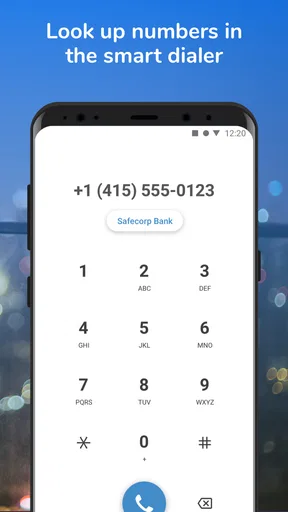
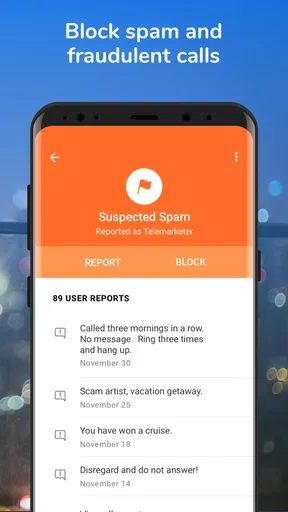
Another feature I found incredibly useful is the spam detection. The app uses a vast database to identify potential spam calls and warns you before you even pick up the phone. It’s like having a crystal ball that tells you when to avoid answering a call.
The app also allows you to report numbers as spam, contributing to the community effort in reducing unwanted calls. It feels good to know you’re part of a larger movement to combat the spam menace.
User Experience and Performance
I’ve used a fair share of call blocking apps, and I must say, the performance of this one is impressive. It doesn’t lag or crash, and it’s light on resources, which means you won’t notice any battery drain. Plus, the app runs smoothly in the background, so you can go about your day without interruptions.
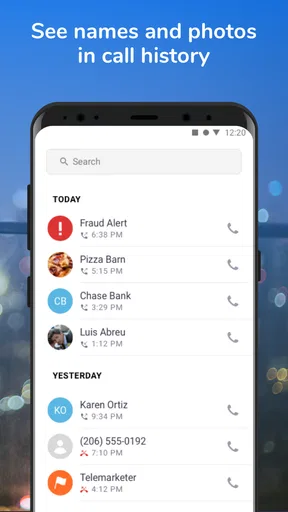
The call logs are also neatly organized, with clear labels indicating which calls were blocked and why. You can review them at any time, giving you full control and transparency over what’s happening on your device.
Advanced Options for Power Users
If you’re like me and love diving into advanced settings, you’ll appreciate the extra customization options. You can set up different levels of blocking, from mild to aggressive, depending on how strict you want to be. And for those important calls you can’t afford to miss, there’s a whitelist feature that ensures they always get through.
Another nifty option is the ability to block calls based on area code, which is perfect if you’re getting bombarded by calls from a specific region. It’s these little touches that show the developers really thought about the user experience.
Who should use it, and who should pass
Mr. Number is most compelling for someone who regularly receives suspicious or disruptive calls and wants more than a manual list of blocked numbers. It is also useful if you want to review call activity and make deliberate decisions about which callers to block. Hiya develops the app, and its focus on caller identification gives the experience a different emphasis from a basic utility that only rejects numbers you have already flagged.
I would be more hesitant to recommend it to someone whose work or family life involves frequent calls from new numbers. In that case, the safest setup is not necessarily the strictest one. Keep a way to inspect missed or blocked calls, and avoid treating a suspected-spam label as proof that a caller is malicious. A legitimate call can be unfamiliar, while unwanted callers can change numbers.
If you change phones or adjust system settings, take a moment to check that your chosen blocking behavior still matches what you want. Call handling can feel different when the device’s built-in controls and a separate screening app are both involved. Rather than enabling every possible filter at once, I’d change one setting, observe the result, and then decide whether to tighten it. That makes it easier to identify which rule caused a missed call if something goes wrong.
Reliability, version, and everyday expectations
The app has been available since July 5, 2010, and its current version is 14.7.5-11717. That long history is useful context for a caller-identification tool, but it does not mean every label will be right or every device will behave identically. I’d keep the call log in mind as a review tool and make sure important contacts are handled deliberately rather than relying on automation alone.
If a call you expected does not come through, check the phone’s recent-call history and the app’s blocked-call records before changing several settings at once. This is a straightforward recovery habit: it helps you see whether the number was filtered and gives you a chance to adjust a specific rule. For people who cannot afford to miss calls, a conservative configuration is more sensible than aggressive blocking.
On performance, I would not assume that a call-screening app is completely invisible on every Android device. The phone’s software and background-management behavior can affect how any such app works. If screening seems inconsistent, confirm that the app is set up as intended and that device-level restrictions are not interfering. The goal is dependable help, not a complicated collection of filters that is hard to troubleshoot.
Its place in the communication category
The app is free, rated for Everyone, and has an average rating of 3.8 from around 204,000 ratings, with roughly 74,000 written reviews and over 10 million installs. Those figures suggest it has reached a broad audience, but they do not tell me whether its approach will suit your calling habits. I’d use them as background, then decide based on whether caller identification and flexible blocking solve a problem you actually have.
Compared with relying only on the phone’s built-in blocking, this app aims to add context around suspicious callers and lets users report numbers. Compared with simply declining unknown calls, it offers a way to make a more informed choice—but it still cannot make every call safe or every identification certain. That distinction matters: the app can help reduce interruptions, while your own judgment remains essential for unusual calls and important business.
For a household, I’d also make sure each person understands how the chosen rules work before relying on them. One person may prefer to block unfamiliar numbers, while another may need to hear from schools, clinics, or delivery services. A shared expectation about what gets blocked can prevent confusion, especially when a missed call looks like a technical problem but is actually the result of a deliberately strict setting.
Why It’s a Must-Have
In today’s world, where our phones are constantly buzzing with unwanted calls, having this app installed feels like a necessity rather than a luxury. It’s empowering to know that you can take control of your call experience and decide who gets to reach you and who doesn’t.
Not only does it save you from the annoyance of spam calls, but it also gives you peace of mind knowing that you won’t miss important calls. It’s a perfect blend of security and convenience, making it a must-have app for anyone who values their time and sanity.
So, if you’re tired of the constant barrage of spam calls and want to take back control of your phone, give it a try. It’s like having a trusty sidekick who’s always got your back. Plus, with its user-friendly interface, it can be a practical addition for people who want caller screening without wrestling with a complicated setup. My performance verdict is positive but measured: it is most useful when you review its decisions and keep the blocking level appropriate to your day, rather than expecting it to catch every nuisance call without oversight.
Verdict
Strengths of Mr. Number: Spam Call Blocker
- Effectively blocks spam calls.
- User-friendly interface.
- Customizable blocking rules.
- Identifies unknown callers.
- Light on battery usage.
Limitations of Mr. Number: Spam Call Blocker
- Some legitimate calls may be blocked.
- Occasional false spam alerts.
- Ads in free version.
- Limited features without subscription.
- Needs constant updates for new numbers.
Other Releases by Hiya
View All
Hiya: Spam Blocker & Caller ID
Communication3.9
Similar Picks in This Category
View All
Google Messages
Google LLC4.6

Gmail
Google LLC4.1

Google Meet
Google LLC4.4

Google Chrome
Google LLC4.1

WhatsApp Messenger
WhatsApp LLC4.6

Carrier Services
Google LLC4.2
Frequently Asked Questions
What features does Mr. Number offer for blocking spam calls?
Mr. Number provides a comprehensive suite of features to block unwanted calls. It automatically identifies known spammers and allows users to block specific numbers, area codes, or even entire countries. Additionally, users can report spam numbers to help enhance the community-driven database for future protection.
Is Mr. Number available for both Android and iOS devices?
Yes, Mr. Number is available for both Android and iOS platforms. Each version is optimized for its respective operating system, ensuring a smooth user experience. Users can download the app from the Google Play Store for Android devices and the App Store for iOS devices.
Does Mr. Number require an internet connection to function effectively?
While Mr. Number can perform basic call blocking without an internet connection, to utilize its full potential—such as accessing the latest spam numbers and updates—an internet connection is required. The app periodically updates its database to protect users from newly identified spammers.
How does Mr. Number handle privacy and data security?
Mr. Number takes user privacy seriously. It does not access personal contacts without permission and ensures that any data shared with the app is handled securely. Users can customize their privacy settings to control what information, if any, is shared with the app's community database.
Can Mr. Number block text messages as well?
Yes, Mr. Number can block unwanted text messages in addition to calls. Users can set up filters to block texts from specific numbers or patterns, providing a robust solution against spam messages. This feature helps users maintain a cleaner and more organized inbox.
